FEATURE
✦ New in 2026
BSO-DOS© Version 2

BSO-DOS© now
fully digitized
at the bedside

The Behavioural Supports Ontario Dementia Observation System (BSO-DOS©) — all 10 behaviour categories, structured step-by-step in VitalLink, with automatic PointClickCare sync. No more paper clipboards.
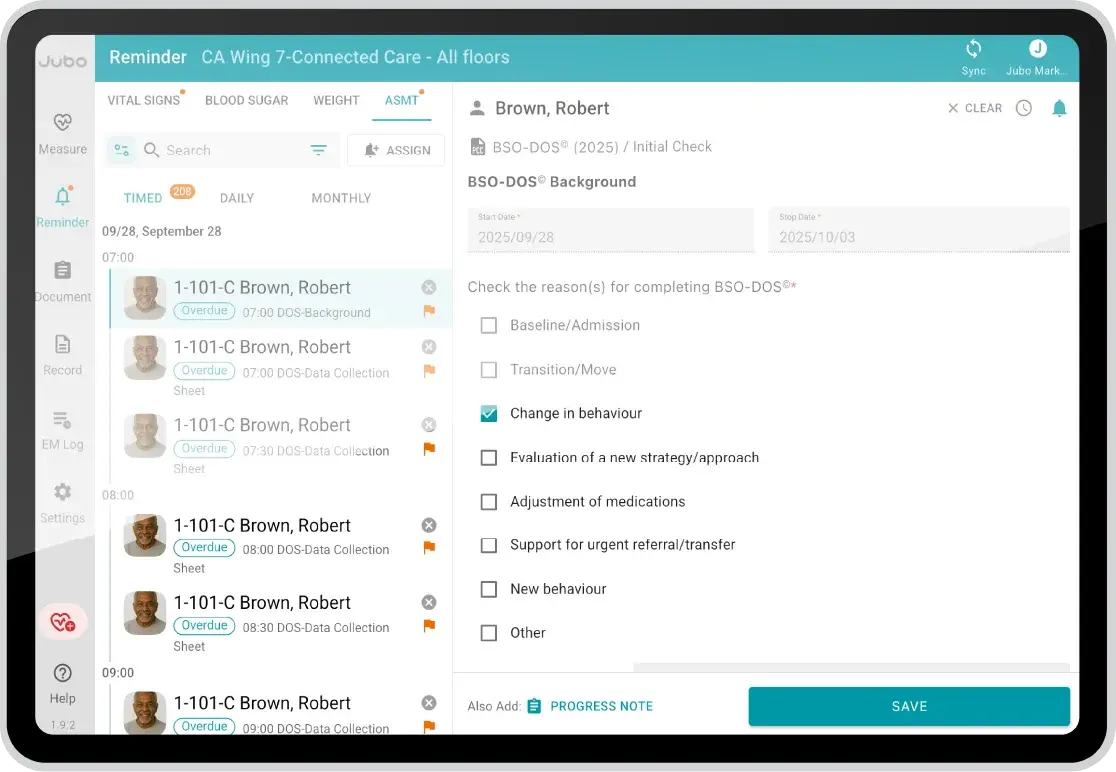
30-min Observation Intervals 5 Consecutive Days 24-Hour Coverage Auto-Syncs to PCC
BSO-eDOS-VL-1

10 behaviour categories colour-coded by type
 

Every 30 minutes · 24 hours · 5 days
 

Whole-team tool — PSWs, nurses, allied health
 

Auto-syncs to PointClickCare
 

PIPEDA & PHIPA compliant
About BSO-DOS©

The gold standard in
dementia behavioural assessment.

The Behavioural Supports Ontario-Dementia Observation System (BSO-DOS©) is a reliable direct observation tool that provides objective data about a person's behaviour every thirty minutes for 24-hours over five consecutive days.

Direct observation is the gold standard in behavioural assessment — it involves the objective collection of information by observing the person in their environment, and is not prone to the recall errors and biases inherent in retrospective documentation.

The data collected is used to identify patterns, trends, and contributing factors associated with responsive behaviours and personal expressions — informing both non-pharmacological approaches and medication reviews.

logo-bso-dos
When to complete a BSO-DOS©
Complete when there is a need to identify behavioural patterns, frequency, duration and level of risk.
5
consecutive observation days
48
half-hour blocks per day
Baseline/Admission Transition/Move Change in Behaviour Evaluation of New Strategy/Approach Adjustment of Medications Support for a Referral/Transfer New Behaviour
BSO-eDOS-VL-2
3-step process
01
Background
Document the reason for completing the BSO-DOS©, the five-day observation period start and stop dates, and clinician signature. This establishes the clinical context for all observations that follow.
Nurse / Allied Health Professional
02
Data Collection Sheet
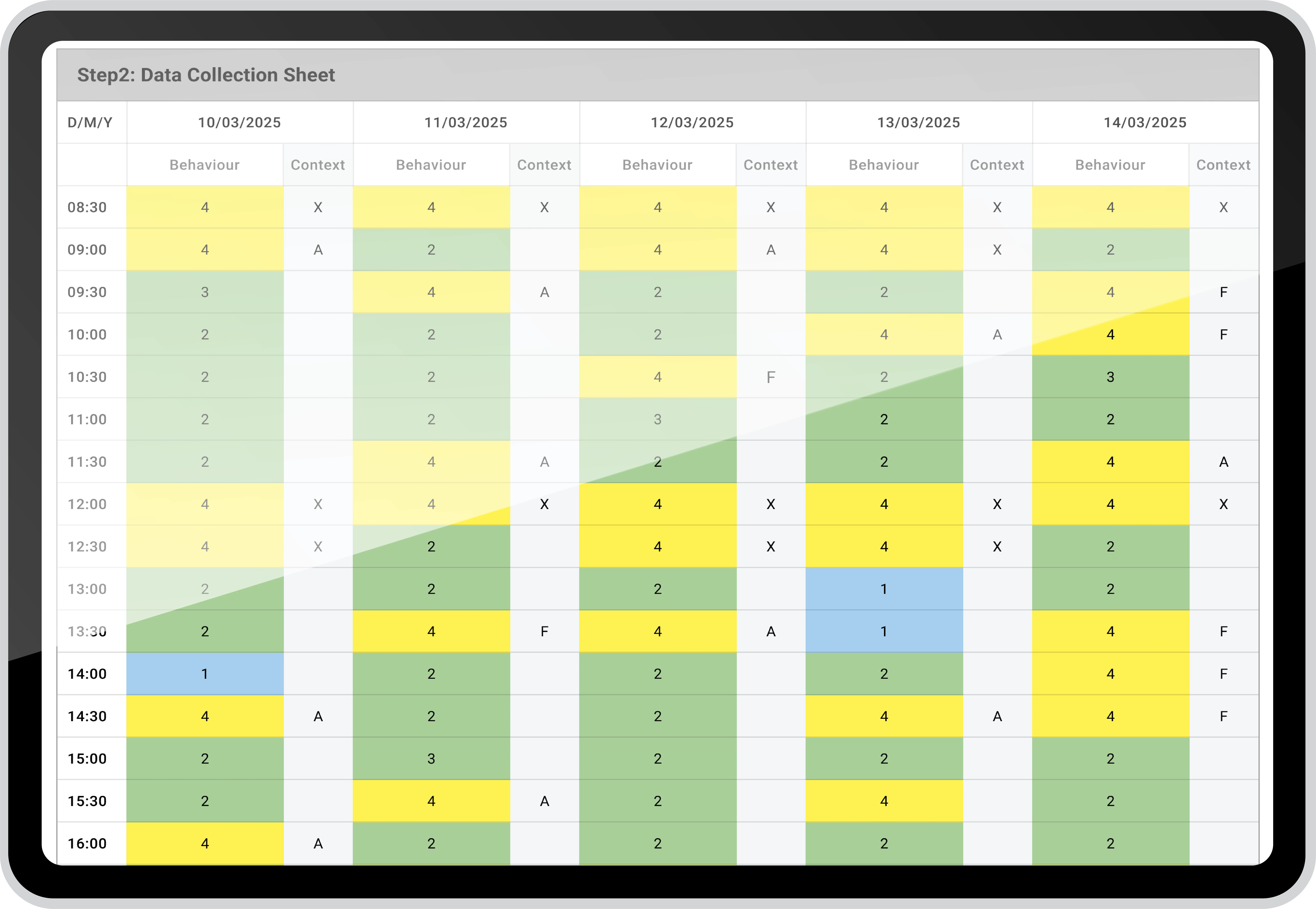
Record the observed behaviour number(s) in each ½-hour time block throughout the day. Note context using the context legend. Check specific behaviours under each category. Runs continuously for 5 days.
Any Point-of-Care Team Member
03
Analysis & Planning
Highlight the data collection sheet by colour-coded category, calculate average blocks per day for each behaviour type, flag concerns for frequency, duration or risk, and write a progress note with next steps.
Nurse / Allied Health Professional
A team approach. Completing the BSO-DOS© requires participation from the whole care team — from PSWs and nurses at the bedside to allied health professionals who lead the analysis and care planning.
Observed Behaviours Legend

10 behaviour categories,
colour-coded for pattern recognition.

Each category is assigned a colour that corresponds to the colour-coded highlighter system used in the Analysis & Planning step, enabling rapid visual pattern identification across the 5-day period.

 
1
Sleeping
Blue · Passive state
 
2
Awake / Calm
Green · Neutral resting state
 
3
Positively Engaged
Green · Conversing, hugging, singing, smiling, laughing, hand holding, kissing, engaged in activity
 
4
Vocal Expressions (Repetitive)
Yellow · Asking questions, crying, moaning, humming, repeating words, sighing, grunting, requests
 
5
Motor Expressions (Repetitive)
Yellow · Banging/rattling, fidgeting, rummaging, pacing, rocking, trying to leave, collecting, disrobing, entering others’ spaces, grinding teeth
 
6
Sexual Expression of Risk
Pink · Sexual comments/questions, requesting sexual favours, sexual threats, sexual /gestures, exposing genitals, self-pleasuring in others’ presence, unwanted touching, forcing others into sexual acts
 
7
Verbal Expression of Risk
Purple · Derogatory insults, swearing, screaming/yelling, threatening
 
8
Physical Expression of Risk
Orange · Biting, choking others, grabbing, hair pulling, hitting/slapping, kicking, pinching, punching, pushing, scratching, self-injuring, spitting, throwing
 
9
Other (Custom)
Defined by the clinical team prior to initiating the BSO-DOS
 
10
Other (Custom)
Additional team-defined behaviour for tracking
Context Legend

Context is recorded in the context column alongside behaviour observations. This column is not mandatory for every 30-minute block, but provides critical information for identifying contributing factors.

A
Alone
Person is by themselves
C
Personal Care
Bathing, incontinence care, toileting
F
Family / Visitors
Family or visitors present
L
Loud / Busy
Loud or busy environment
Q
Quiet
Quiet environment
R
Directed at Resident
Expressions directed at resident/patient/visitor
S
Directed at Staff
Expressions directed at staff
X
Other (Custom)
Additional context defined by clinical team
Y
Other (Custom)
Second additional context option
Tip from the User Guide: Before initiating the BSO-DOS©, the clinical team should decide if they need to track additional behaviours not captured in categories 1–8 — these can be added to slots #9 and #10, and additional context can be noted as X or Y. This customization should be established before data collection begins.
Before & After VitalLink

The same care team.
Completely different experience.

VitalLink doesn't change the BSO-DOS© protocol — it removes every piece of friction that makes it hard to do consistently.
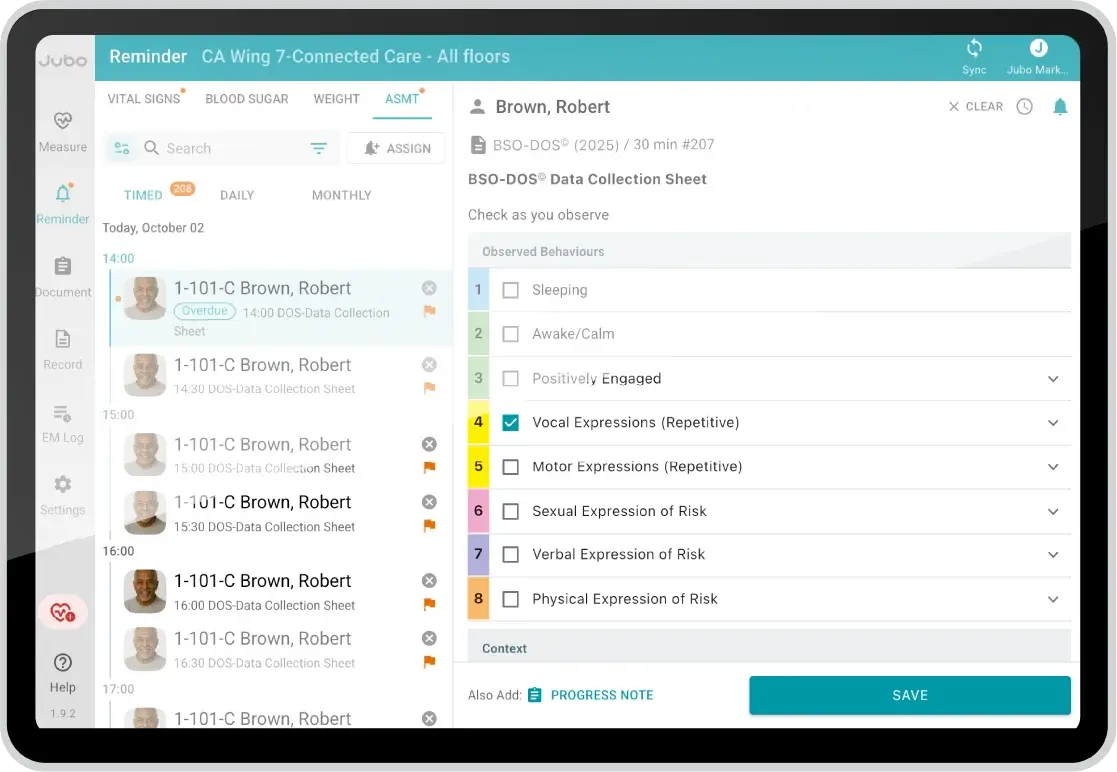
BSO-DOS Digital - VitalLink by Jubo
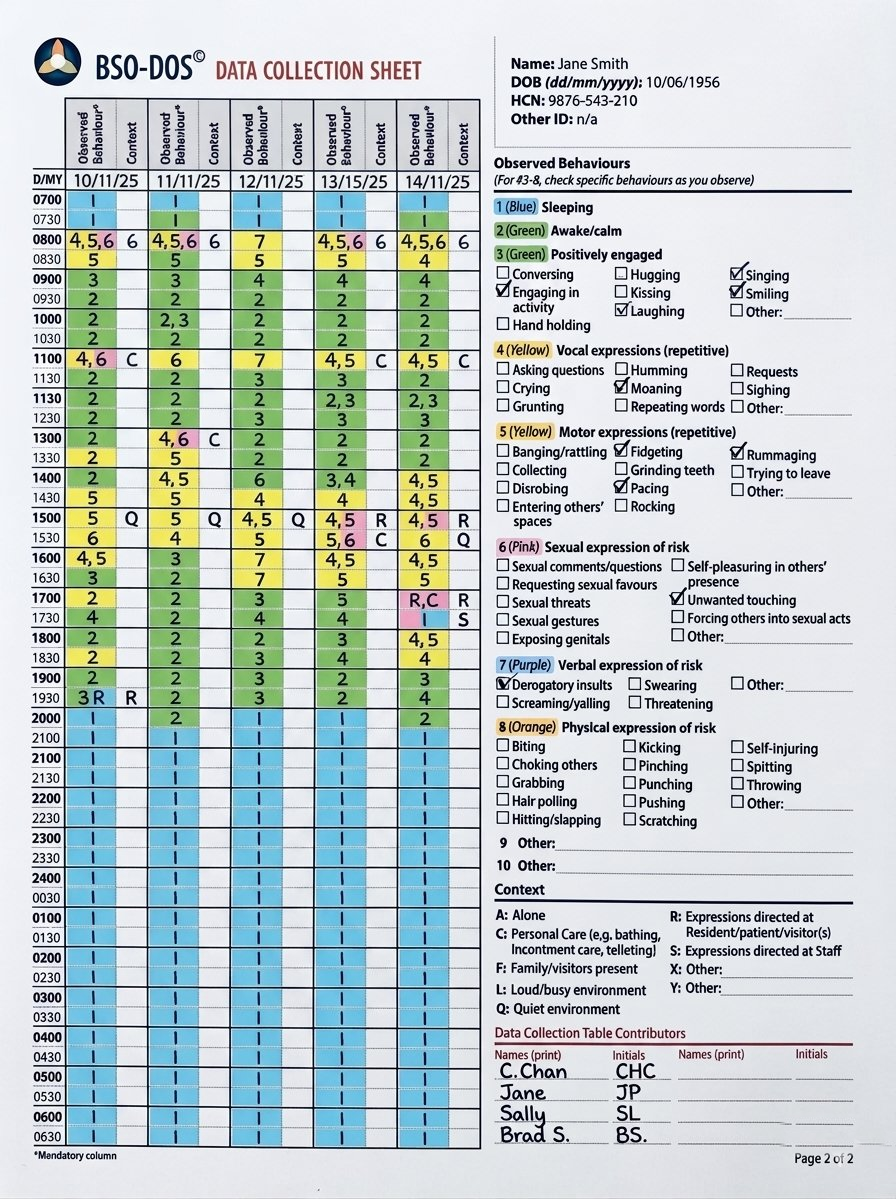
Before VitalLink
Paper BSO-DOS©
 
5-day observation requires paper docs
Printed sheets distributed to all shifts — risk of loss, damage, or incomplete handoff
Pain point
 
Multiple forms are cumbersome
Separate Background, Data Collection, and Analysis sheets — easy to misplace or mix up across 5 days
Pain point
 
Manual 30-minute documentation
Locate the paper form, with no timed prompts, every 30-minutes — blocks are missed or filled in retrospectively
Pain point
 
Behavioural analysis is fully manual
Nurse must highlight with coloured highlighters, manually count blocks, and calculate averages per category
Pain point
 
Paper records are difficult to share
Data must be manually transcribed into PointClickCare and introduces transcription errors
Pain point
 
Compliance is inconsistent
No system to prompt observations — blocks are skipped, especially overnight or during busy shifts
Pain point
vl-bso-dos-step-2-DC
After VitalLink
Digital BSO-DOS©
 
Streamlined digital forms — one record, all shifts
All five days of observations live in a single persistent record. PSWs, nurses and allied health all contribute to the same form
Solved
 
Guided 3-step workflow — no missing sections
Background, Data Collection, and Analysis are all within one structured workflow. Role-based access ensures the right people complete each step
Solved
 
Timed 30-minute prompts with one-tap entry
App prompts at each 30-min interval. Team members tap the colour-coded behaviour number
Solved
 
Real-time data capture with auto colour-coding & calculation
On Day 5, VitalLink automatically highlights, counts, and calculates averages per category — exactly as the BSO-DOS© User Guide specifies
Solved
 
Auto-generates progress note and syncs to PCC
Analysis findings are quickly added to the Progress Note with one tap. Everything syncs automatically to PointClickCare — no manual transcription
Solved
 
Interdisciplinary team access — consistent compliance
Every team member sees the same live record. Missed blocks are visible immediately, not discovered days later
Solved
~4-5 hrs
saved per BSO-DOS© cycle vs. paper
0
manual transcription steps to PointClickCare
100%
of observation blocks prompted & timestamped
5
days of complete continuous data — every shift
Paper vs. VitalLink

The same protocol.
Without the clipboard.

Every step of the BSO-DOS© process — background, data collection, and analysis — is guided within VitalLink and synced automatically to PointClickCare. No manual entry, no transcription, no lost sheets.

Step  
Traditional
Paper BSO-DOS©
~347 mins
VitalLink
Digital BSO-DOS©
~68 mins
Time Saving
(Mins)
Step 1 —
Background
 
Print correct version, distribute to floor
15 min
Open BSO-DOS template in VitalLink, fill in background
5 min
10 min
Step 2 —
Data
Collection
Collection
Manually fill in each 30-min block with number codes and context across 5 days
~1 min × 48 x 5 days
240 mins
Tap behaviour number(s) at each 30-min prompt
~0.1 min × 48 x 5 days
120 mins
120 mins
Collation
Collect and collate sheets after 5 days
20 min
Data auto-aggregated on Day 5 completion
Auto
20 min
Step 3 —
Analysis &
Planning
Highlighting
Manually highlight each block with coloured highlighters
45 min
Automatically colour-coded by VitalLink
Auto
45 min
Calculation
Count and calculate blocks per category, per day
30 min
Count and calculate blocks per category
Auto
30 min
Progress notes
entry
Cross-reference behaviour data and write progress notes side-by-side.
20 min
Complete analysis and care planning with the data collection table visible for reference; auto-populate findings into the PCC progress note
15 min
5 min
PointClickCare
data entry
Transcribe data collection results into PointClickCare manually
25 min
Results auto-sync to PointClickCare
Auto
25 min
Total Time (Nurse & PSW)
395 mins
6.58 hours
140 mins
2.33 hours
~4–5 hrs
saved
Methodology: These are estimated time savings. 6.58 hrs (395 min ÷ 60) – 2.33 hrs (140 min ÷ 60) = 4.25 hours saved per cycle. These are estimations based on pilot user results. Actual time savings may vary by organization, team size, and workflow.
VitalLink + BSO-DOS©

Everything the protocol requires.
Built into the app.

VitalLink doesn't just digitize the form — it guides the entire BSO-DOS© workflow from initiation through analysis, matching every step from the official BSO-DOS© User Guide.

 
Guided data collection

Every 30-minute observation block is prompted in the app. Team members tap the colour-coded behaviour number(s) they observe — no codes to memorize, no handwriting to decipher.

 
All 10 behaviour categories available
 
Context column with full legend
 
Custom #9 and #10 slots configurable
 
Shift-persistent observations

Data is stored continuously across all five days. PSWs, nurses and allied health professionals all observe and record from the same live record — no paper to hand off between shifts.

 
No incomplete sheets from missed handoffs
 
Timestamps to actual observation time
 
Full 24-hour coverage across all roles
 
Auto-calculated analysis

On Day 5, VitalLink automatically calculates the average number of 1-hour blocks per day for each behaviour category — the exact calculation the BSO-DOS© User Guide specifies. No manual math required.

 
Per-day and 5-day totals calculated
 
Frequency, duration and risk flags
 
Replaces manual colour-highlighting step
 
PointClickCare native sync

All BSO-DOS© data — background, observations, analysis results, and progress notes — syncs automatically to PointClickCare. No manual transcription between systems.

 
Bidirectional PCC integration
 
Audit-ready documentation trail
 
Supports referral and care transfer records
 
Cross-sector standardization

A standardized digital BSO-DOS© allows use of a consistent clinical tool both within and across organizations — promoting a common language and shared data analysis processes that support better care coordination.

 
Consistent tool across all floors/units
 
Supports referrals to BSO specialists
 
Aligns with BSO Provincial standards
 
Structured progress notes

VitalLink pre-populates the analysis findings — behaviour types observed, patterns, time-of-day trends, and possible contributing factors — so the responsible nurse or AHP can complete the progress note faster and with greater precision.

 
Analysis summary pre-populated
 
Guided next-steps prompts
 
Documents planned care plan updates
BEHAVIOURAL SUPPORTS ONTARIO

Resources to support
BSO-DOS© implementation.

Behavioural Supports Ontario (BSO) provides a full suite of implementation resources to support healthcare teams in adopting the BSO-DOS© Version 2. These resources are freely available and designed to support everyone from front-line PSWs to organizational leaders.

VitalLink is designed to complement and align with all BSO educational materials — so teams trained on the paper BSO-DOS© will find the same workflow, language, and structure in the app.

Implementation Checklist
Download and print BSO-DOS© Version 2 (or activate in VitalLink)
Discard unused copies of old DOS versions
Gather leaders/educators to plan implementation
Print/share Fact Sheet with team leaders
Share User Guide with point-of-care team
Assign Instructional Video to team members
Organize sessions using the Slide Deck
Trial with a resident and discuss outcomes as a team
Behavioural Supports Ontario
BSO Provincial Coordinating Office
www.brainxchange.ca/BSODOS

All official BSO-DOS© Version 2 resources are available at this URL, including print-ready versions of the tool, instructional materials, and implementation support.

Behavioural Supports Ontario (BSO) is a provincial program supporting persons with dementia and their caregivers across Ontario's continuum of care.
RESOURCES
BSO-DOS© Fact Sheet
A concise overview of what the BSO-DOS© is, its purpose, the value of direct observation, and when to complete it. Ideal for sharing with team leaders and clinical educators.
Download from BSO →
BSO-DOS© User Guide
Step-by-step illustrated guidance for completing all three sections of the BSO-DOS©. Designed for point-of-care team members. A Community User Guide edition is also available for family care partners.
Download from BSO →
BSO-DOS© Resource Manual
A comprehensive reference document for clinical educators and leaders. Covers evidence base, implementation guidance, and frequently asked questions for all team roles.
Download from BSO →
BSO-DOS© Instructional Video
A visual walkthrough of the complete BSO-DOS© process — from initiating the background section through to the analysis. Recommended for all point-of-care team members before their first observation.
Watch on BSO →
BSO-DOS© Slide Deck + Speaking Notes
Ready-to-use educational presentation for team training sessions, with accompanying speaking notes. Organize an in-service using this deck to get your full team aligned before beginning observations.
Download from BSO →
BSO-DOS© Community User Guides
Two resources support community use of the BSO-DOS©: Community Guidelines for clinicians working with family care partners, and a Community User Guide for family care partners completing the Data Collection Sheet.
Download from BSO →
WHAT CARE LEADERS SAY

Trusted by nurses.
Loved by administrators.

"The digital BSO-DOS data finally told us what was actually happening — the time of day, the context, the patterns. VitalLink made the whole process something our PSWs could actually keep up with across every shift."

"A major improvement in workflow reliability, documentation quality, and compliance transparency. My team cannot work without VitalLink.”

“VitalLink has improved staff satisfaction, made their jobs easier, supported time management, and had a positive impact on resident care outcomes.”

Frequently Asked Questions

Common questions about
BSO-DOS© in VitalLink.

Still have questions?

Our team is familiar with the BSO-DOS© and can walk you through how VitalLink handles every step of the protocol. Book a 30-minute demo.

Book a Demo →
BSO Support
For clinical questions about the BSO-DOS© protocol itself, contact the BSO Provincial Coordinating Office at provincialbso@nbrhc.on.ca or 1-855-276-6313.
Does VitalLink follow the official BSO-DOS© Version 2 format? +
Yes. VitalLink's BSO-DOS© module is structured to match the official three-step BSO-DOS© Version 2 format — Background (Step 1), Data Collection Sheet (Step 2), and Analysis & Planning (Step 3). All 10 behaviour categories, the context legend, and the analysis calculation method align with the BSO Provincial Coordinating Office's June 2025 User Guide.
Which team members can record observations in VitalLink? +
Any point-of-care team member — Personal Support Workers, nurses, and allied health professionals — can record observations on the Data Collection Sheet. The Background section (Step 1) and Analysis & Planning section (Step 3) are restricted to team members whose scope of practice includes assessment and analysis, such as registered nurses or allied health professionals.
Can we track custom behaviours (#9 and #10)? +
Yes. Before initiating the BSO-DOS© observation period, the clinical team can configure custom behaviour labels for slots 9 and 10 within VitalLink. These custom behaviours are then available to all point-of-care team members during the observation period and are included in the automated analysis calculations.
How does VitalLink handle the highlighting and calculation step? +
The manual highlighting and calculation steps are eliminated entirely. When the five-day observation period concludes, VitalLink automatically counts the ½-hour blocks per behaviour category per day, totals them across all five days, and calculates the average number of 1-hour blocks per day — exactly as specified in the BSO-DOS© User Guide. The nurse or AHP reviews the pre-calculated results rather than doing manual math.
Do we still need the paper BSO-DOS© resources from BSO? +
The BSO's educational resources — the Fact Sheet, User Guide, Instructional Video, and Slide Deck — are still valuable for training your team on the clinical purpose and process of the BSO-DOS©. VitalLink digitizes the data collection and analysis, but the BSO's materials help your team understand why each step matters. We recommend using both together, especially when onboarding new team members to the protocol.

Be among the first homes
to go digital with BSO-DOS©.

Book a personalized 30-minute demo tailored to your care setting and team size.

Free Demo · No Commitment · 48hr Onboarding

Care facilities of all sizes use VitalLink

Lorem ipsum dolor sit amet, consectetur adipiscing elit, sed do eiusmod tempor incididunt ut labore et dolore magna aliqua.